How to Analyze and Research Information Very Quickly from YouTube in the Age of AI
Stop watching hour-long videos to find three useful minutes. Pull the transcript, let an AI triage it, ask sharp questions, then check the claims that matter.
A lot of the useful knowledge on the internet now lives in YouTube videos. Founders explain their numbers, engineers walk through their setups, and people who tried something for six months tell you what went wrong. The problem is the format. A 50-minute video often holds five minutes of what you need, and you can’t skim a video the way you skim a page.
I’ve stopped watching most videos start to finish. Instead I treat a video as a document: get the text, let an AI sort it, ask it questions, and only watch the parts that earn it. Here’s the workflow I use.
1. Get the transcript, not the video
Everything starts with text. There are four easy ways to get it:
- YouTube itself. Under the description, click “Show transcript”. Copy it out. Fine for one video.
- yt-dlp. One command pulls the subtitles without downloading the video:
yt-dlp --skip-download --write-auto-subs --sub-langs en --convert-subs srt <url>This is what I use when I’m going through several videos at once. - Local speech-to-text. If a video has no subtitles, or they’re bad, run the audio through Whisper (faster-whisper works well on a normal GPU). It runs on your own machine, so nothing gets uploaded.
- Obsidian Web Clipper. My favourite for one-offs. One click on the YouTube page saves a note with the title, link, channel, date and the full timestamped transcript. It’s research material and a saved note in one step.
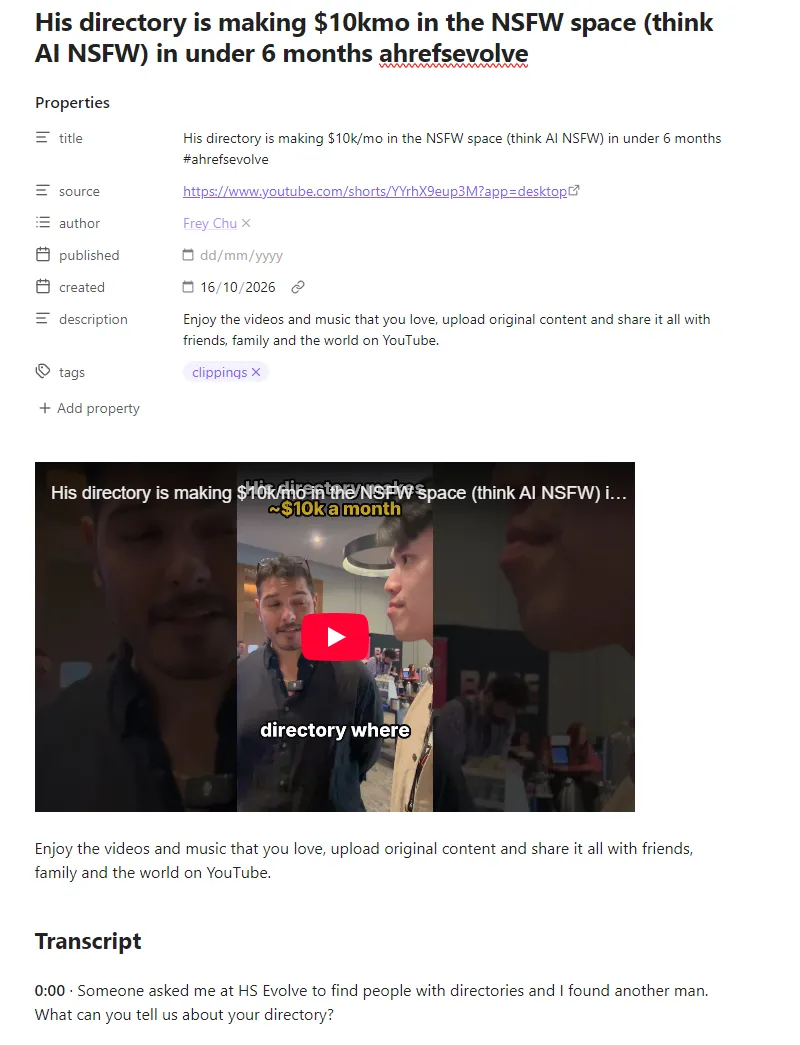
A YouTube Short about a directory site, clipped into Obsidian. The transcript starts at 0:00, ready to paste into an AI or search later.
Keep the timestamps. They’re how you jump back to the exact moment a claim was made.
2. Triage before you commit any time
Paste the transcript into your AI of choice and ask for a triage, not a summary:
“Here is a video transcript. In 10 bullet points: what does the speaker claim, what evidence do they give for each claim, and what are they selling? Then tell me which 2–3 timestamps are worth watching and why.”
That last question is the important one. Most videos turn out to be one idea stretched over 40 minutes. Some are genuinely dense, and then the AI tells you where the density is. Either way you’ve spent two minutes deciding instead of fifty watching.
If you’d rather not copy and paste: Google’s NotebookLM accepts YouTube links as sources, and YouTube has been rolling out a Gemini “Ask” button under some videos. Both work for public videos. I use them for quick questions and my own pipeline for anything I want to keep.
3. Ask the questions you actually have
A summary answers the speaker’s question. You want answers to yours. Good follow-ups:
- “What would I need to do this myself, step by step? What does it cost?”
- “Which numbers in this video are specific and checkable, and which are vague?”
- “What does the speaker skip or gloss over?”
- “Where does this contradict [other video or article]?”
When I was deciding whether a cold email strategy from YouTube made sense for my directory sites, the useful output wasn’t the summary. It was the list of conditions the strategy quietly depended on, because those are what decide whether it fits your situation.
4. Compare several videos at once
One video is an opinion. Five videos on the same topic start to look like research. Pull the transcripts for a handful of videos, label each with its title and channel, and ask:
“Where do these speakers agree, where do they disagree, and which claims appear in only one video?”
Claims that only one person makes, especially the person selling a course, deserve the most suspicion. Claims everyone repeats deserve some too, because people copy each other.
5. Check what matters before you rely on it
An AI reading a transcript is only as good as the transcript. Auto-captions mangle names, numbers and jargon, and a model will happily repeat a mistake with confidence. Before I act on anything:
- Jump to the timestamp and hear the claim myself.
- Check numbers at the source: the revenue page, the docs, the price list, the court ruling.
- Ask who benefits. Sponsored segments, affiliate links and “my course” pitches shape what gets said.
This step is quick, because by now you’re only checking three or four claims, not watching the whole thing.
6. Keep what you learned
Research you can’t find again is wasted. My notes go into Obsidian, often starting from a Web Clipper note like the one above: the video link, the one-paragraph takeaway, the timestamps worth revisiting, and what I checked. Over time that turns into a searchable library of what I actually learned, rather than a “Watch later” list I’ll never get through.
My setup: private and mostly local
I already run AI agents through Telegram, so the natural setup is to send a link from my phone and get the triage back a minute later. The pieces:
- yt-dlp pulls the subtitles, and Whisper handles videos without them.
- A local model on my own PC (Qwen 27B through llama.cpp) does the triage and questions. No per-token bill, and nothing I’m researching leaves my network.
- The result lands as a note in my Obsidian vault.
You don’t need any of that to start. The copy-paste version in steps 1–3 gets you most of the value today.
A note on fairness to creators
Using transcripts for your own research is one thing. Republishing someone’s transcript, or an AI rewrite of their whole video, as your own content is another. Quote briefly, link to the video, and credit the creator. If a video saved you real time, watch the part that mattered, with ads, and subscribe. That’s how the people making the good stuff keep making it.
The short version
- Get the transcript.
- Ask the AI for claims, evidence, what’s being sold and which timestamps matter.
- Ask your own questions, not for a summary.
- Compare several videos for anything important.
- Check the few claims you’ll act on.
- Save the takeaway somewhere you’ll find it.
An hour of video becomes ten minutes of focused reading and a couple of minutes of watching.